Original: $148.00
-65%$148.00
$51.80The Story
Key Takeaways:
- Delivers up to 2Gbps download speeds and up to 1Gbps upload speeds using advanced mid/high-split DOCSIS 3.1 technology, making it one of the fastest consumer cable modems available.
- Approved for use with Xfinity (including 900Mbps/100Mbps plans), Spectrum, Cox, Optimum, and other major U.S. cable providers. Not compatible with Xfinity Voice plans.
- Two 1-Gigabit Ethernet ports support link aggregation for multi-gig wired throughput to a compatible router, and owning this modem can save you up to $300 per year in ISP equipment rental fees.
Affiliate Disclosure: ModemGuides.com earns from qualifying purchases through affiliate links at no extra cost to you.
Overview
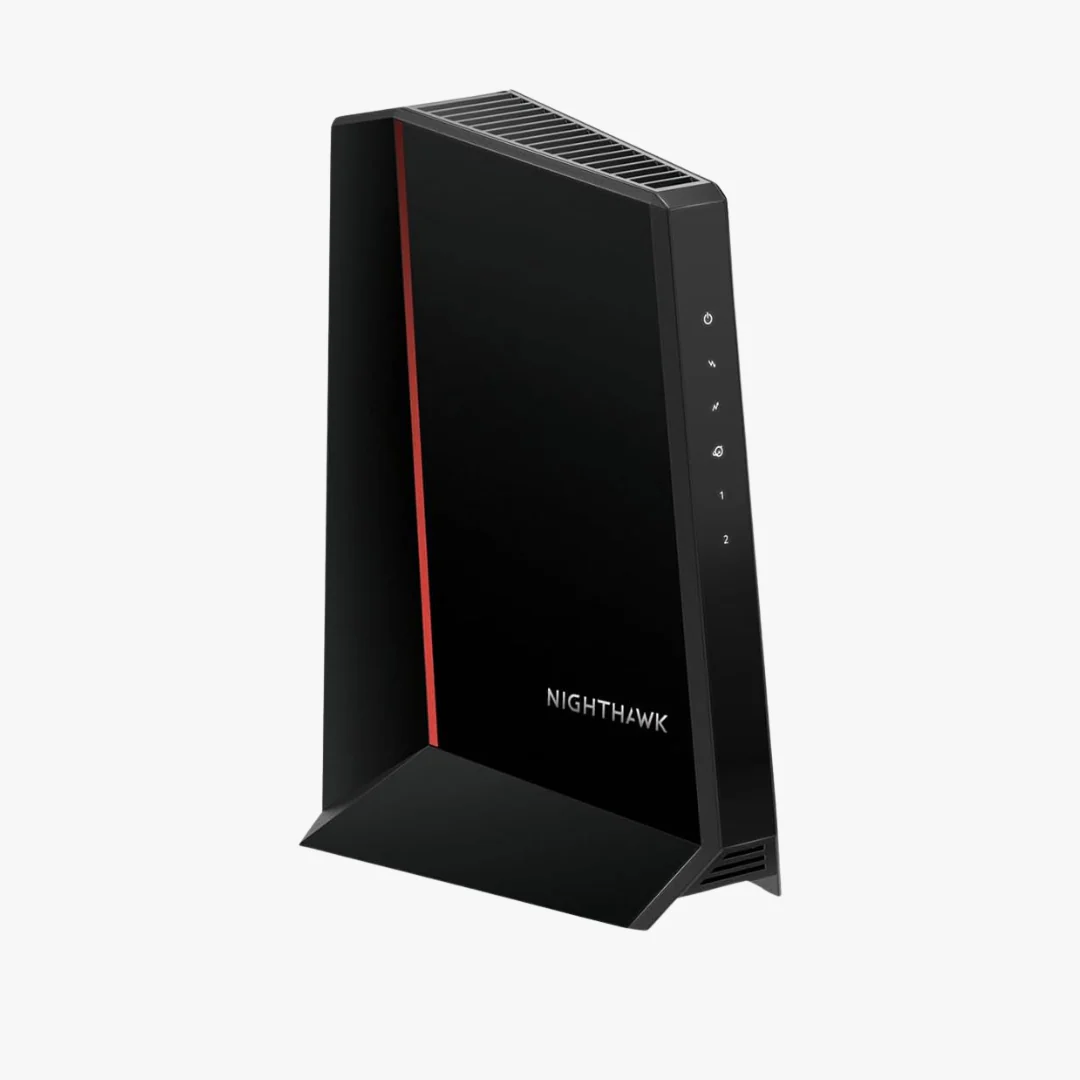
The NETGEAR Nighthawk CM2500 is a standalone DOCSIS 3.1 cable modem built around mid/high-split technology. Unlike standard DOCSIS 3.1 modems that rely on low-split channel configurations, the CM2500 allocates significantly more frequency spectrum to upstream traffic, enabling upload speeds up to 10 times faster than what most DOCSIS 3.1 modems can deliver. For households juggling video calls, cloud backups, live streaming, security camera feeds, and online gaming at the same time, this translates to noticeably better performance across the board.
The CM2500 is a modem only. It does not broadcast WiFi on its own. You will need to pair it with a separate wireless router or mesh system. NETGEAR recommends connecting it to a WiFi 6E or WiFi 7 router, or an Orbi mesh system, to get the most out of the modem's multi-gig throughput. This standalone design gives you full control over your network hardware and the flexibility to upgrade your router independently.
Speed and Performance
The CM2500 supports maximum download speeds of 2Gbps and upload speeds of up to 1Gbps, depending on your ISP plan and network configuration. To reach the full 2Gbps downstream, you need to use both Ethernet ports with link aggregation enabled on a compatible router. Each individual Ethernet port supports up to 1Gbps.
On Xfinity, the CM2500 unlocks access to the 900Mbps download and 100Mbps upload speed tier that requires a mid/high-split modem. With Spectrum and Cox, it supports their highest available DOCSIS 3.1 tiers as well. The mid/high-split architecture also positions this modem to handle faster upload tiers as cable providers roll them out over the next few years, so you are not buying hardware that will be outdated within one upgrade cycle.
ISP Compatibility
The Nighthawk CM2500 is approved for use with the following major U.S. cable internet providers:
- Xfinity (Comcast), including plans up to 900Mbps/100Mbps. Not compatible with Xfinity Voice plans.
- Spectrum (Charter)
- Cox Communications
- Optimum (Altice)
It is not compatible with fiber, DSL, or satellite internet services. If your provider is not listed, check with them directly to confirm DOCSIS 3.1 mid/high-split modem support before purchasing.
WiFi and Parental Controls
Because the CM2500 is a standalone modem, it does not have built-in WiFi radios or parental control features. Your WiFi signal strength, coverage, and any content filtering or parental controls will depend entirely on the router or mesh system you connect to it. If parental controls are a priority, look for routers that offer robust app-based management with device-level filtering, scheduled access, and content blocking. NETGEAR's own Armor security suite (available on Nighthawk and Orbi routers) and similar platforms from TP-Link (HomeCare) and eero (eero Secure) are strong options to pair with this modem.
For WiFi coverage, pairing the CM2500 with a WiFi 6E or WiFi 7 mesh system will give you the best combination of speed and whole-home range. A mesh setup is especially worth considering if your home is larger than 2,000 square feet or has multiple floors.
Technical Specifications
| Brand | NETGEAR |
|---|---|
| Model | Nighthawk CM2500 |
| DOCSIS Version | 3.1 (Mid/High-Split) |
| Max Download Speed | 2 Gbps (with link aggregation) |
| Max Upload Speed | Up to 1 Gbps (ISP plan dependent) |
| Ethernet Ports | 2 x 1-Gigabit (link aggregation supported) |
| Dimensions | 6.8" L x 3.7" W x 8.2" H |
| Weight | 1.09 lbs |
| Color | Black |
| Built-in WiFi | No (standalone modem) |
| Built-in Parental Controls | No (requires separate router) |
| Compatible ISPs | Xfinity, Spectrum, Cox, Optimum |
| UPC | 724129256482 |
| Price (MSRP) | $249.99 |
What Is in the Box
- NETGEAR Nighthawk CM2500 cable modem
- 1 Ethernet cable
- Power adapter
- Quick start guide
Who Should Buy the NETGEAR Nighthawk CM2500
This modem is a strong fit for households on Xfinity, Spectrum, or Cox plans with speeds above 600Mbps, especially if your current modem does not support mid/high-split DOCSIS 3.1. Remote workers uploading large files, content creators pushing video to the cloud, families with multiple simultaneous streamers and gamers, and anyone running home security cameras with remote access will benefit from the dramatically improved upload bandwidth. It also makes financial sense for anyone currently renting a modem from their ISP, since the $249.99 purchase price pays for itself in under a year at typical rental rates of $15 to $25 per month.
If you are on a basic plan under 300Mbps or your provider does not yet support mid/high-split tiers, a standard DOCSIS 3.1 modem may be all you need for now.
Frequently Asked Questions
Does the NETGEAR Nighthawk CM2500 have built-in WiFi?
No. The CM2500 is a standalone cable modem without built-in WiFi. You need to connect it to a separate wireless router or mesh system to broadcast a WiFi network. NETGEAR recommends pairing it with a WiFi 6E, WiFi 7, or Orbi mesh system for best performance.
Is the NETGEAR CM2500 compatible with Xfinity?
Yes. The CM2500 is approved for use with Xfinity and can unlock plans with 900Mbps download and 100Mbps upload speeds that require a mid/high-split modem. It is not compatible with Xfinity Voice plans.
Does the NETGEAR CM2500 have parental controls?
No. The CM2500 is a modem only and does not include parental control features. Parental controls such as content filtering, screen time scheduling, and device-level access management are handled by your router. Look for routers with built-in parental control suites like NETGEAR Armor, TP-Link HomeCare, or eero Secure.
What is mid/high-split DOCSIS 3.1 and why does it matter?
Mid/high-split refers to how the modem divides its available frequency spectrum between downloads and uploads. Standard DOCSIS 3.1 modems use a low-split configuration that limits upload bandwidth. Mid/high-split allocates more spectrum to uploads, enabling speeds up to 1Gbps upstream. This matters because many cable providers are rolling out faster upload tiers that require a mid/high-split modem to access.
How do I get 2Gbps speeds on the NETGEAR CM2500?
To reach the full 2Gbps download speed, you need to connect both of the CM2500's 1-Gigabit Ethernet ports to a router that supports link aggregation. Each port handles up to 1Gbps individually, so both must be active and bonded to achieve 2Gbps throughput. Your ISP plan must also support speeds at or above 2Gbps.
Will the NETGEAR CM2500 work with Spectrum or Cox?
Yes. The CM2500 is approved for use with Spectrum, Cox, Optimum, and other major U.S. cable internet providers. Check with your provider to confirm they support mid/high-split DOCSIS 3.1 service in your area.
How much can I save by buying the NETGEAR CM2500 instead of renting?
Most cable ISPs charge between $15 and $25 per month to rent a modem. At $249.99, the CM2500 pays for itself in roughly 10 to 17 months. Over a typical three-year ownership period, you could save between $290 and $650 compared to renting.
Description
Key Takeaways:
- Delivers up to 2Gbps download speeds and up to 1Gbps upload speeds using advanced mid/high-split DOCSIS 3.1 technology, making it one of the fastest consumer cable modems available.
- Approved for use with Xfinity (including 900Mbps/100Mbps plans), Spectrum, Cox, Optimum, and other major U.S. cable providers. Not compatible with Xfinity Voice plans.
- Two 1-Gigabit Ethernet ports support link aggregation for multi-gig wired throughput to a compatible router, and owning this modem can save you up to $300 per year in ISP equipment rental fees.
Affiliate Disclosure: ModemGuides.com earns from qualifying purchases through affiliate links at no extra cost to you.
Overview
The NETGEAR Nighthawk CM2500 is a standalone DOCSIS 3.1 cable modem built around mid/high-split technology. Unlike standard DOCSIS 3.1 modems that rely on low-split channel configurations, the CM2500 allocates significantly more frequency spectrum to upstream traffic, enabling upload speeds up to 10 times faster than what most DOCSIS 3.1 modems can deliver. For households juggling video calls, cloud backups, live streaming, security camera feeds, and online gaming at the same time, this translates to noticeably better performance across the board.
The CM2500 is a modem only. It does not broadcast WiFi on its own. You will need to pair it with a separate wireless router or mesh system. NETGEAR recommends connecting it to a WiFi 6E or WiFi 7 router, or an Orbi mesh system, to get the most out of the modem's multi-gig throughput. This standalone design gives you full control over your network hardware and the flexibility to upgrade your router independently.
Speed and Performance
The CM2500 supports maximum download speeds of 2Gbps and upload speeds of up to 1Gbps, depending on your ISP plan and network configuration. To reach the full 2Gbps downstream, you need to use both Ethernet ports with link aggregation enabled on a compatible router. Each individual Ethernet port supports up to 1Gbps.
On Xfinity, the CM2500 unlocks access to the 900Mbps download and 100Mbps upload speed tier that requires a mid/high-split modem. With Spectrum and Cox, it supports their highest available DOCSIS 3.1 tiers as well. The mid/high-split architecture also positions this modem to handle faster upload tiers as cable providers roll them out over the next few years, so you are not buying hardware that will be outdated within one upgrade cycle.
ISP Compatibility
The Nighthawk CM2500 is approved for use with the following major U.S. cable internet providers:
- Xfinity (Comcast), including plans up to 900Mbps/100Mbps. Not compatible with Xfinity Voice plans.
- Spectrum (Charter)
- Cox Communications
- Optimum (Altice)
It is not compatible with fiber, DSL, or satellite internet services. If your provider is not listed, check with them directly to confirm DOCSIS 3.1 mid/high-split modem support before purchasing.
WiFi and Parental Controls
Because the CM2500 is a standalone modem, it does not have built-in WiFi radios or parental control features. Your WiFi signal strength, coverage, and any content filtering or parental controls will depend entirely on the router or mesh system you connect to it. If parental controls are a priority, look for routers that offer robust app-based management with device-level filtering, scheduled access, and content blocking. NETGEAR's own Armor security suite (available on Nighthawk and Orbi routers) and similar platforms from TP-Link (HomeCare) and eero (eero Secure) are strong options to pair with this modem.
For WiFi coverage, pairing the CM2500 with a WiFi 6E or WiFi 7 mesh system will give you the best combination of speed and whole-home range. A mesh setup is especially worth considering if your home is larger than 2,000 square feet or has multiple floors.
Technical Specifications
| Brand | NETGEAR |
|---|---|
| Model | Nighthawk CM2500 |
| DOCSIS Version | 3.1 (Mid/High-Split) |
| Max Download Speed | 2 Gbps (with link aggregation) |
| Max Upload Speed | Up to 1 Gbps (ISP plan dependent) |
| Ethernet Ports | 2 x 1-Gigabit (link aggregation supported) |
| Dimensions | 6.8" L x 3.7" W x 8.2" H |
| Weight | 1.09 lbs |
| Color | Black |
| Built-in WiFi | No (standalone modem) |
| Built-in Parental Controls | No (requires separate router) |
| Compatible ISPs | Xfinity, Spectrum, Cox, Optimum |
| UPC | 724129256482 |
| Price (MSRP) | $249.99 |
What Is in the Box
- NETGEAR Nighthawk CM2500 cable modem
- 1 Ethernet cable
- Power adapter
- Quick start guide
Who Should Buy the NETGEAR Nighthawk CM2500
This modem is a strong fit for households on Xfinity, Spectrum, or Cox plans with speeds above 600Mbps, especially if your current modem does not support mid/high-split DOCSIS 3.1. Remote workers uploading large files, content creators pushing video to the cloud, families with multiple simultaneous streamers and gamers, and anyone running home security cameras with remote access will benefit from the dramatically improved upload bandwidth. It also makes financial sense for anyone currently renting a modem from their ISP, since the $249.99 purchase price pays for itself in under a year at typical rental rates of $15 to $25 per month.
If you are on a basic plan under 300Mbps or your provider does not yet support mid/high-split tiers, a standard DOCSIS 3.1 modem may be all you need for now.
Frequently Asked Questions
Does the NETGEAR Nighthawk CM2500 have built-in WiFi?
No. The CM2500 is a standalone cable modem without built-in WiFi. You need to connect it to a separate wireless router or mesh system to broadcast a WiFi network. NETGEAR recommends pairing it with a WiFi 6E, WiFi 7, or Orbi mesh system for best performance.
Is the NETGEAR CM2500 compatible with Xfinity?
Yes. The CM2500 is approved for use with Xfinity and can unlock plans with 900Mbps download and 100Mbps upload speeds that require a mid/high-split modem. It is not compatible with Xfinity Voice plans.
Does the NETGEAR CM2500 have parental controls?
No. The CM2500 is a modem only and does not include parental control features. Parental controls such as content filtering, screen time scheduling, and device-level access management are handled by your router. Look for routers with built-in parental control suites like NETGEAR Armor, TP-Link HomeCare, or eero Secure.
What is mid/high-split DOCSIS 3.1 and why does it matter?
Mid/high-split refers to how the modem divides its available frequency spectrum between downloads and uploads. Standard DOCSIS 3.1 modems use a low-split configuration that limits upload bandwidth. Mid/high-split allocates more spectrum to uploads, enabling speeds up to 1Gbps upstream. This matters because many cable providers are rolling out faster upload tiers that require a mid/high-split modem to access.
How do I get 2Gbps speeds on the NETGEAR CM2500?
To reach the full 2Gbps download speed, you need to connect both of the CM2500's 1-Gigabit Ethernet ports to a router that supports link aggregation. Each port handles up to 1Gbps individually, so both must be active and bonded to achieve 2Gbps throughput. Your ISP plan must also support speeds at or above 2Gbps.
Will the NETGEAR CM2500 work with Spectrum or Cox?
Yes. The CM2500 is approved for use with Spectrum, Cox, Optimum, and other major U.S. cable internet providers. Check with your provider to confirm they support mid/high-split DOCSIS 3.1 service in your area.
How much can I save by buying the NETGEAR CM2500 instead of renting?
Most cable ISPs charge between $15 and $25 per month to rent a modem. At $249.99, the CM2500 pays for itself in roughly 10 to 17 months. Over a typical three-year ownership period, you could save between $290 and $650 compared to renting.